Showing posts with label funny. Show all posts

Tuesday, 23 August 2011

Facebook Funny Trick – Pirate English

With two simple clicks you can Translate Facebook into Pirate English for a good laugh.
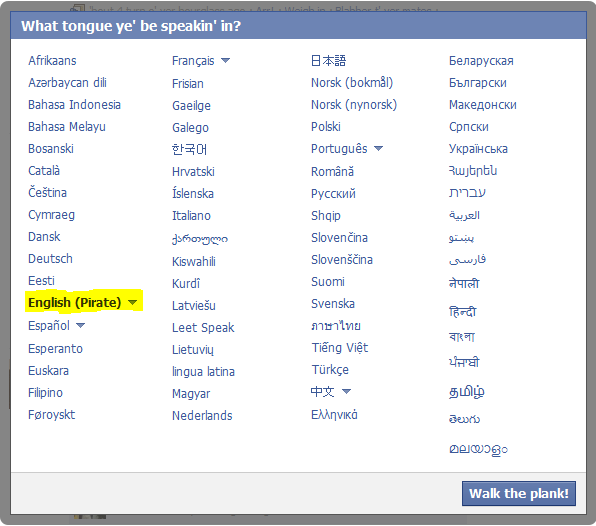
To make the change while logged into Facebook simply go to the footer in the bottom left hand corner of the screen, and click on the English language link:

Once you click this link a pop-up menu will appear and you can select “English (Pirate)” and change your language to pirate english!


Instead of “Logout” the Pirate translation is “Abandon Ship.”  Instead of “Share” the translation says “Divvy spoils t’ all ye mateys.”  Yeaarr-harr-harr!

Sunday, 21 August 2011

Google Magic Tricks "Google Gravity"

Google always has many interesting things to do in it

This is a Another Funny Tricks Of Google!

This is Called Google Gravity

It allows every components on Google homepage to fall down and be able to move freely.


Way How to Play/ Enable Google Gravity ‘I am Feeling Lucky’

  1. Visit http://www.google.com/.
  2. Turn off the Google Instant Search
  3. Type in Google Gravity into the search box.
  4. Click on I’m Feeling Lucky button and wait for some seconds.
  5. Move the mouse.
  6. You can start play with Google Gravity enjoy
.

Note that the trick works best in Google Chrome and Safari, but appears to be working only partially in Firefox, and not working in Internet Explorer.


A remastered version of Google homepage will appear, where all components on the web pages will falling down to the bottom of the web browser (due to gravity) on any mouse hovers over. Best of all, these components – images, text, text boxes, buttons and etc. can be freely move around, and even threw to anywhere.

You Go Also Directly To Google Gravity Follow This Link


http://mrdoob.com/projects/chromeexperiments/google_gravity/


Please Comment If You Like This Post

Monday, 8 August 2011

Tricks To Convert Keyboard Into Live Disco

This is a real funny trick with which you can amuse you friends.It doesnot require any programming skills on your part.This trick will make your keyboard LED’s blink like disco lights.This method is based on an a vb script.The blinking of the lights will continue until and unless you stop it.This looks more fascinating in the dark as the keyboard led’s are very small.OK,now here is the step by step tutorial

1.Open notepad.You can open notepad by doing a right click on your desktop and then new->text document.

2.Copy and paste the code below into the notepad

Set wshShell =wscript.CreateObject("WScript.Shell")
do
wscript.sleep 100
wshshell.sendkeys "{CAPSLOCK}"
wshshell.sendkeys "{NUMLOCK}"
wshshell.sendkeys "{SCROLLLOCK}"
loop


3.Save the file with name disco.vbs
4.Double click on the saved file and your keyboard Led’s will start blinking like disco lights.
5.To stop the disco lights open task manager.You can open task manager by doing a right click on your taskbar and then selecting task manager.
6.Now locate wscript.exe and select it.Click on “ End Process “.